Annotations and dimensions
Read the guide
Dimension the scenery in a viewport, then give small details enough room to read on the sheet.
Dimension the drawing in its own scale
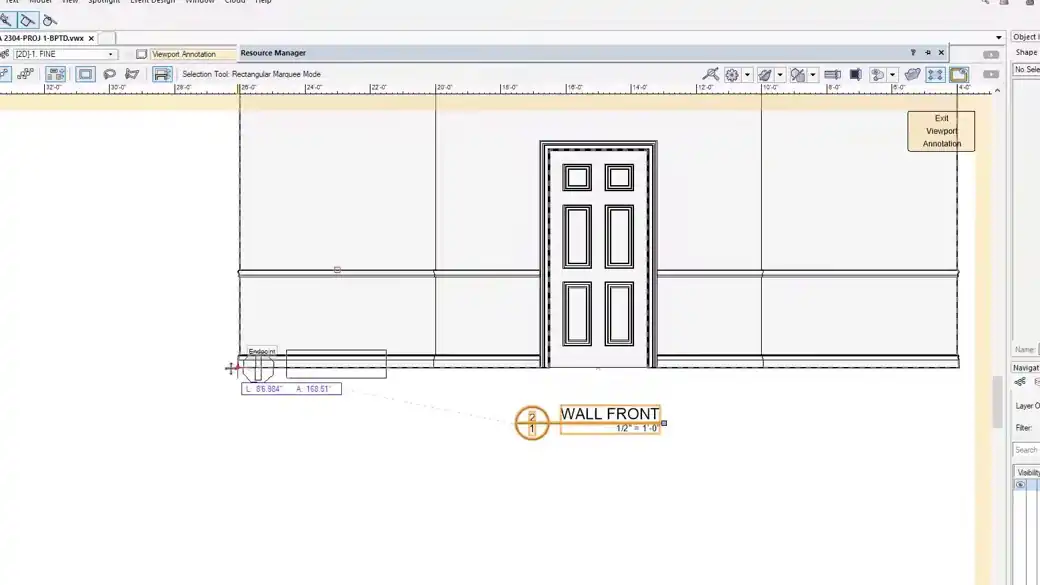
Enter the viewport’s Annotations space before dimensioning the scenery. The viewport knows the scale of the view, so a dimension reports the represented length. On the sheet itself, the same two points describe the distance on the paper.
Give a detail its own view
When a molding or joint is too small to read, make a Detail Viewport and give it a larger scale. Use the detail marker to show where it belongs. Read the overall drawing and the detail together before you add another string of dimensions.
Work through it
- Place the elevation viewport at the drawing scale you plan to issue. Give it a drawing number and a title so the detail callout has somewhere to point.
- Enter the viewport’s Annotations space and snap the dimension to model geometry. Start with an overall width and height, then add the dimensions someone needs to locate the opening.
- Create a larger-scale view for the jamb or trim. Put the small dimensions there and check that the detail reference matches the drawing and sheet number.
Quick reference
- Overall dimension
- Establishes how wide or tall the assembly is. It gives the builder a check on the full piece.
- Locating dimension
- Positions an opening or feature from a stable datum such as an edge or centerline.
- Detail dimension
- Describes a smaller feature such as a reveal, material thickness, or fastener spacing in a larger-scale view.
Put it into a scenic drawing
For a 16-foot scenic wall with a 3-foot opening, show the overall width and the opening location on the elevation. Use the jamb detail to call out trim thickness and the reveal. Compare the plotted sheet at its intended print size.
What to check
If a dimension is much smaller than expected, confirm that you entered Annotations and snapped to the actual geometry. If two strings describe the same thing, keep the one that answers the builder’s question.